
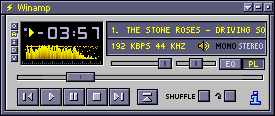
It's called EGS. i found it a long time ago, and have no clue who made it or even where i got it. overly designed WinAmp skins suck, and the basic one is too basic. EGS is pretty much the same thing, but smoothed out. it looks good when minimized as well; the colours in the playlist stand out, so it's easy to see which song is playing when minimized.
***
HotAmp is a simple utility program that lets you control music playback in Winamp with hotkeys. it lets you easily play/pause/stop/next/previous tracks in WinAmp while you're using other programs, so that WinAmp doesn't have to be in focus. so if you're writing HTML or designing in Photoshop, you can hit Ctrl-Alt-Home to pause instead of moving your mouse over and clicking the tiny pause button in the minimized WinAmp window.
Full Controls:
| Play: | Ctrl-Alt-Insert |
| Pause: | Ctrl-Alt-Home |
| Stop: | Ctrl-Alt-End |
| Next Track: | Ctrl-Alt-Page Up |
| Previous Track: | Ctrl-Alt-Page Down |
it's very small and sits in your system tray. i have mine setup in StartUp as minimized. the official site is xerosoft.com, but it seems to be down, so you can download the file here.
***
MP3ext is a shell extension so that you can access ID3 tags from a Property panel. it also lets you see the bit rates of mp3 files in Windows explorer. i'm using the WinAmp theme here:
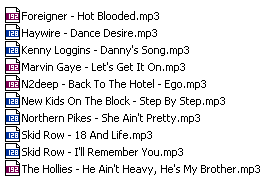
(shut up, those are all good songs)

You are a bad, bad man.